
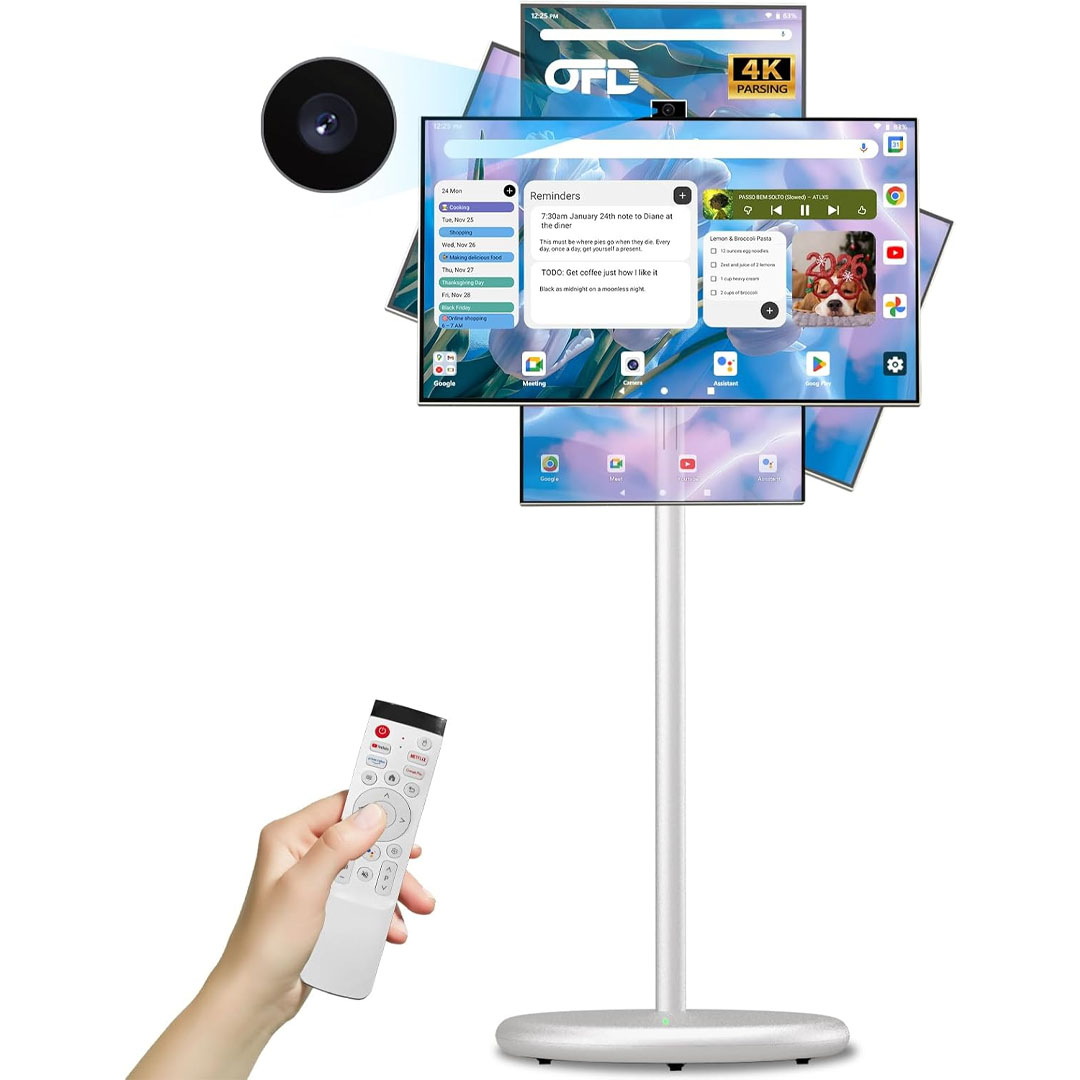
The OFD 27-Inch Portable TV on Wheels 2nd Generation is a multi-functional, state-of-the-art media and productivity tool tailored for contemporary living. Boasting a 27-inch 1080P Full HD screen with 100% sRGB color fidelity, it delivers vivid, lifelike visuals whether you’re watching films, hosting presentations, or conducting video conferences. The interactive touchscreen offers seamless control, while its rotatable screen provides adjustable viewing angles, making it ideal for both domestic and professional environments. The stylish off-white exterior adds a modern, elegant touch, and the mobile, wheeled design ensures smooth, convenient relocation from one space to another.
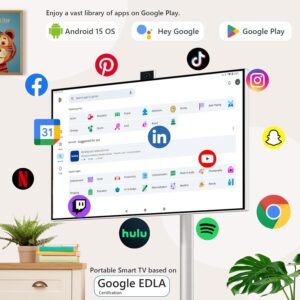
Running on Android 15 OS, this TV delivers effortless access to applications, streaming services, and intelligent features, supported by 6GB of RAM and 128GB of internal storage for smooth operation and plenty of space for media, documents, and apps. Its 4K camera ensures crystal-clear video calls, while the USB-A remote makes navigation and control simple and convenient. The device is EDLA-certified, ensuring dependable display quality and energy-efficient performance, and the built-in 9000mAh battery allows for continuous usage even without a nearby power source.
The OFD Portable TV on Wheels is engineered for maximum convenience and adaptability. Perfect for office presentations, virtual classes, gaming, or home entertainment, it blends portability with powerful performance. Its mobile design paired with durable hardware ensures users can experience immersive visuals and intelligent functionality wherever needed. Featuring touchscreen operation, swivel rotation, and extended battery life, this 2nd Generation model raises the benchmark for portable smart TVs, making it a valuable choice for both work and leisure.
Specification
Here’s a specification overview for the OFD 27 In Portable TV on Wheels 2nd Gen (Off White) based on available product listings and official details:
Display & Design
- Screen Size: 27 inches (LCD with IPS technology)
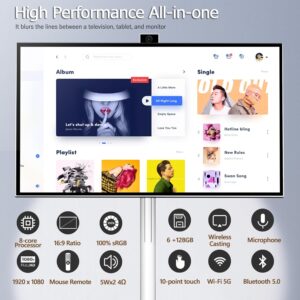
- Resolution: Full HD 1920 × 1080 pixels
- Color Gamut: 100 % sRGB for accurate color reproduction
- Refresh Rate: 60 Hz
- Touch: 10‑point capacitive touchscreen
- Aspect Ratio: 16:9
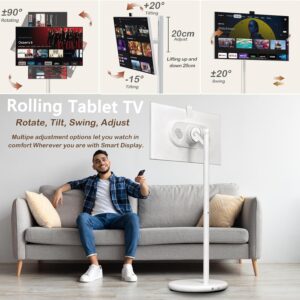
- Viewing Adjustment: Height ±20 cm, tilt adjustment, and screen rotation ±90° for flexible viewing positions
Performance & OS
- Operating System: Android 15 (smart TV platform with Google certification — access to Play Store and apps)
- Processor: Octa‑core (commonly Kompanio‑class) for general smart features
- Memory: 6 GB RAM
- Storage: 128 GB ROM (internal storage)
Camera & Audio
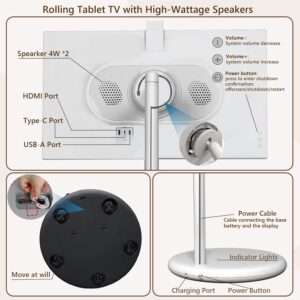
- Front Camera: 4K autofocus webcam (Lift by hand; can be tucked away for security) with ~8 MP sensor
- Speakers: Built‑in audio (stereo) for media and calls
Power & Battery
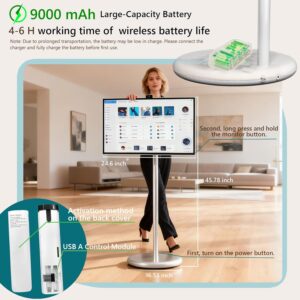
- Battery Capacity: 9000 mAh (≈ 99.8 Wh) rechargeable battery
- Play/Use Time: Up to ~5 hours per charge
- Charging Time: ~3 hours to full charge
Connectivity & Ports
- Wireless: Wi‑Fi 6.0 and Bluetooth 5.1
- Ports:
- HDMI
- USB‑A
- USB‑C (supporting OTG)
- Screen Sharing / Projection: Wireless via TranScreen app (phone → TV)
Mobility & Build
- Stand: All‑in‑one screen + stand + rolling base
- Wheels: Quiet swivel wheels for easy movement
- Weight: ~13.2 kg (approx.)
- Certification: EDLA (Enterprise Device License Agreement) certified display quality
Key Feature
Here are the key features of the OFD 27 In Portable TV on Wheels 2nd Gen (Off White):
Display & Mobility
- 27‑inch Full HD (1080p) IPS LCD with 100% sRGB color accuracy for vibrant, true‑to‑life visuals.
- 10‑point capacitive touchscreen for intuitive touch interaction.
- Adjustable screen height and swivel rotation — raise/lower ±20 cm and rotate up to ±90° for flexible viewing orientations.
- Mobile stand with silent swivel casters — effortlessly relocate the TV anywhere.
Smart Performance
- Android 15 OS (with full Google certification) for access to Google Play, streaming apps (Netflix, YouTube, etc.), and smart features.
- 6 GB RAM + 128 GB internal storage — smooth multitasking and plenty of space for apps and media.
Camera & Connectivity
- 4K front camera with autofocus — ideal for clear video calls, meetings, and conferencing; camera can be raised/hidden for privacy.
- Multiple connectivity options: Wi‑Fi 6.0, Bluetooth 5.1, HDMI, USB‑A, and USB‑C ports for easy connection to laptops, consoles, storage devices, and more.
- Wireless screen sharing support via TranScreen app.
Battery & Controls
- Integrated 9000 mAh battery — provides around 5 hours of unplugged use.
- Comes with a remote featuring voice commands and Google Assistant (2nd Gen).
- Basic tactile controls for power and volume directly on the device.
These capabilities make the OFD Portable TV on Wheels an adaptable solution for on-the-go entertainment, meetings, video conferencing, and smart TV use in homes, workplaces, schools, or creative environments.
How to use the Portable smart TV on Wheels
Here’s a step-by-step guide on how to use the OFD 27 In Portable TV on Wheels 2nd Gen:
1. Setup & Power
- Gently remove the TV from the packaging and set it on a level surface or keep it on its wheeled stand.
- Verify the battery charge before using the TV cordless. Its integrated 9000 mAh battery provides up to around 5 hours of mobility.
- Connect the power adapter to recharge or use the TV without interruption.
- Switch on the TV via the side power button or the supplied remote control.
2. Adjust Viewing Position
- Height Adjustment: Raise or lower the screen by ±20 cm for optimal eye level.
- Swivel Rotation: Rotate the screen up to ±90° to face different angles or people.
- Mobility: Roll the TV to a new position using the caster wheels — engage the locks to keep it in place.
3. Using the Smart Features
- Touchscreen Control: Control apps, menus, and settings directly through the 10-point touch display.
- Remote Control: Operate the TV with the supplied USB-A remote for browsing, audio control, and voice functions.
- Connect to Wi-Fi & Bluetooth: Go to Settings → Network to connect to the internet or pair Bluetooth devices like speakers, keyboards, or headphones.
4. Video Calls & Camera
- Front 4K Webcam: Flip up the camera when using video conferencing apps (Zoom, Google Meet, Teams).
- Privacy: Shut the camera when inactive to ensure security.
5. Media & Storage
- Install Apps: Use Google Play Store on Android 15 to download streaming apps, games, or productivity tools.
- Connect External Devices: Use USB-A, USB-C, or HDMI ports to connect laptops, gaming consoles, or external storage.
- Wireless Screen Sharing: Use the TranScreen app to mirror your phone or tablet screen to the TV.
6. Power Off & Storage
- Switch off the TV with the included remote or the side-mounted button when finished.
- Secure the casters if the TV is to remain in one spot.
- Ensure the battery stays charged during frequent use to maximize longevity.
Tips suitable for the Portable smart TV on Wheels
Here are some practical tips for using the OFD 27 In Portable TV on Wheels 2nd Gen to maximize performance, safety, and convenience:
1. Placement & Mobility
- Smooth Surfaces: Place the rolling TV on level, sturdy surfaces to avoid toppling.
- Avoid Obstacles: Clear the way before rolling the TV to prevent scratches and caster wear.
- Lock Wheels When Stationary: Activate the wheel brakes when using the TV for long sessions or meetings.
2. Display & Viewing
- Optimal Viewing Distance: Position yourself roughly 3–5 feet away from the 27-inch display for optimal viewing.
- Swivel & Height: Modify the screen’s height and angle to minimize glare and improve neck comfort.
- Avoid Direct Sunlight: Exposure to direct sunlight can create glare or reduce screen clarity.
3. Battery & Power
- Charge Regularly: Maintain regular charging of the 9000 mAh battery to extend its life and avoid frequent full discharges.
- Use Adapter for Heavy Usage: When using the TV for extended streaming or gaming, keep it connected to power to avoid depleting the battery.
- Check Charging Cable: Always use the supplied power adapter for safe charging and to avoid overheating.
4. Connectivity & Apps
- Wi-Fi Stability: Link to a reliable Wi-Fi network for uninterrupted streaming and software updates.
- Keep Apps Updated: Keep apps up to date through Google Play Store to ensure security and optimal performance.
- Bluetooth Pairing: Connect Bluetooth 5.1 peripherals for reduced latency and improved sound.
5. Camera & Privacy
- Close Webcam When Not Needed: Avoid unintended recording and protect your privacy.
- Clear Lens: Clean the 4K camera periodically using a soft, dry cloth to maintain clear video quality.
6. General Care
- Touchscreen Care: Handle with care; keep sharp items away to protect the surface.
- Keep Clean: Clean the display and casing with a soft microfiber cloth, steering clear of strong chemicals.
- Temperature: Keep away from heaters and direct sunlight to prevent heat damage to the electronics.
Cleaning Guide
Here’s a safe and effective guide on how to clean your OFD 27 In Portable TV on Wheels 2nd Gen without damaging the screen or electronics:
1. Power Off & Unplug
- Always power down the TV and unplug it before cleaning.
- When operating on battery, make sure it isn’t connected to the charger while cleaning.
2. Cleaning the Screen
- Gently clean fingerprints, dust, and smudges with a soft microfiber cloth.
- For tough marks, moisten the cloth slightly with distilled water or a display-safe cleaning solution.
- Do not spray any liquid straight onto the display — always put it on the cloth first.
- Do not use paper towels, coarse cloths, or harsh cleaners, as they may damage the touchscreen.
3. Cleaning the Body & Wheels
- Clean the off-white body using a soft cloth lightly moistened with gentle soapy water.
- Wipe dry right away using a clean, dry microfiber cloth.
- Inspect the caster wheels for dirt or debris and clean any buildup to maintain smooth movement.
4. Cleaning the Camera
- Gently clean the 4K camera lens using a dry microfiber cloth.
- Do not press hard to avoid damaging or misaligning the components.
5. Additional Tips
- Frequency: Wipe the display and casing weekly, or as required, to keep it looking and working its best.
- Avoid Chemicals: Do not clean with alcohol, ammonia, or abrasive chemicals to prevent damage to the screen and casing.
- Ventilation: Keep the ventilation openings clear of dust by gently cleaning with a soft brush or low-pressure compressed air.
What to avoid when using the Portable smart TV on Wheels
Here’s a detailed list of things to avoid when using the OFD 27 In Portable TV on Wheels 2nd Gen to ensure safety, longevity, and optimal performance:
1. Placement & Environment
- Avoid uneven surfaces: Moving or positioning the TV on uneven surfaces can lead to tipping or damage.
- Do not place near heaters or direct sunlight: High temperatures may reduce battery lifespan and damage the plastic housing and display performance.
- Avoid high humidity or moisture: Contact with water may harm internal electronics and impair touchscreen operation.
2. Screen & Touch Controls
- Do not press with sharp objects: Operate the touchscreen with your fingers or a soft stylus, as sharp objects may cause scratches.
- Avoid cleaning with harsh chemicals: No alcohol, ammonia, or abrasive cleaners.
3. Power & Battery
- Do not let the battery fully drain repeatedly: This may shorten the battery’s lifespan.
- Avoid using incompatible chargers or cables: Use only the supplied power adapter and USB-A/USB-C ports.
- Do not attempt to open or disassemble the device: This may void the warranty and cause damage to internal parts.
4. Camera & Privacy
- Never force the webcam open or closed: The 4K camera is fragile and may be damaged if handled improperly.
- Avoid leaving the camera exposed unnecessarily: Keep it closed when not in use to maintain privacy and reduce dust accumulation.
5. Connectivity & Devices
- Avoid overloading USB ports: Connecting devices that are not compatible may result in errors or failures.
- Do not use unstable Wi-Fi or network connections for critical tasks: Can affect streaming or video calls.
6. General Usage
- Avoid dropping or bumping the TV: The display and internal components are delicate.
- Do not stack heavy objects on the TV: This may harm the housing, wheels, or touch display.
In conclusion, the OFD 27 In Portable TV on Wheels 2nd Gen is a versatile, mobile smart TV that combines Full HD 1080P display, 100% sRGB color accuracy, and touchscreen control with Android 15, 6GB RAM, and 128GB storage for smooth performance. Its rolling design, swivel rotation, 9000mAh battery, and 4K webcam make it ideal for entertainment, video calls, and presentations. With EDLA-certified visuals and multiple connectivity options, it offers a premium, convenient, all-in-one solution for both home and professional use.